---
title: "Evaluation Kits"
description: "Alp Lab ships two evaluation kits, one per form factor. Both EVKs double as reference designs that customer boards can fork — most production boards inherit ~80 % of the EVK's chip population."
source: https://docs.alplab.ai/e1m/evk
---
# Evaluation Kits
Alp Lab ships two evaluation kits, one per form factor. Both EVKs double as **reference designs** that customer boards can fork — most production boards inherit ~80 % of the EVK's chip population.
| EVK | Module form factor | Hosts | Reference |
|-----------------|--------------------|----------------------------------|--------------------------------------------------------------------------|
| **E1M EVK** | E1M (35 × 35 mm module) | E1M-AEN family | [`docs/boards/e1m-evk.md`](https://github.com/alplabai/alp-sdk/blob/main/docs/boards/e1m-evk.md) |
| **E1M-X EVK** | E1M-X (45 × 65 mm module) | E1M-X V2N family, V2N-M1 family | [`docs/boards/e1m-x-evk.md`](https://github.com/alplabai/alp-sdk/blob/main/docs/boards/e1m-x-evk.md) |
## E1M EVK (UG-E1M-001)
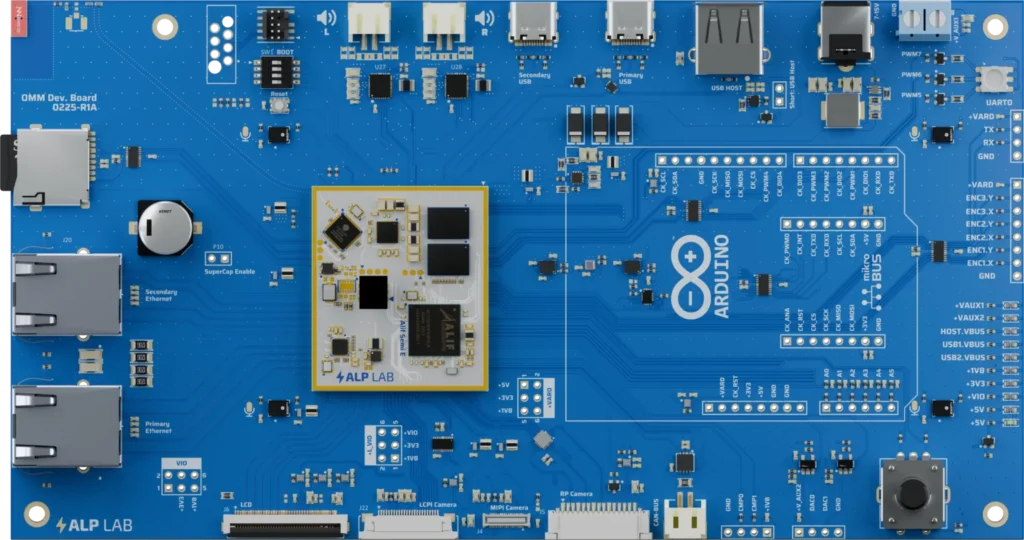 The E1M EVK hosts E1M-AEN family modules on its E1M footprint (35 × 35 mm module). The current board is **2641-R3**, described in the [E1M EVK user guide (UG-E1M-001)](https://docs.alplab.ai/e1m/evk/documents/e1m-evk-user-guide); on it the module sits on a spacer PCB (mounting option (a) of E1M-STD-1.0 §5.2).
Debug and console on the 2641-R3 board: the on-board RP2040 (`U55`, USB on `J5`) is the debugger, which flashes and debugs the E1M-AEN, and it is also the USB-to-UART console. A J-Link on the 10-pin debug header `J2` is optional; the SDK's AEN flash commands (`tan flash`, Flow C / Flow D) are written for use with a J-Link.
The RGB LED `D19` on the 2641-R3 board is red on pad B5 (`E1M_GPIO_PWM3`), green on A6 (`E1M_GPIO_PWM0`) and blue on B6 (`E1M_GPIO_PWM1`).
:::note[The SDK board preset describes the earlier 2626-R2 board]
The population below is what the SDK's board preset declares in alp-sdk v0.17.0. That preset follows the earlier **2626-R2** board. The 2641-R3 board differs (UG-E1M-001): it fits **no** IMUs, **no** BMP581 and **no** TCAL9538 I/O expander; the cameras connect to `J3` (15-pin MIPI CSI) and `J4` (24-pin parallel DVP) without a camera mux; the encoder is a header (`J18`) with no push switch; and in addition to the six `INA236` monitors it has two `INA228` monitors on the module 5 V supply at `0x43` and `0x47`.
:::
Population declared by the alp-sdk v0.17.0 preset (2626-R2):
- Two IMUs — `bmi323` and `icm42670` (the app picks which at runtime)
- Barometric pressure sensor (`bmp581`)
- Six current monitors (`ina236`) at `0x40`..`0x42` and `0x49`..`0x4B` — see the [`+V_CAM0` address note](#ina236-v_cam0-address-re-strap) below
- I/O expander (`tcal9538`, main expander at `0x73`)
- MIPI CSI 2:1 camera mux (`cam_mux_pi3wvr626`); no camera sensor is soldered
- Two speaker amps (`tas2563`, `0x4D` / `0x4E`), four PDM microphones (`pdm_mic`)
- Rotary encoder with push switch, RGB LED (on 2626-R2: red `PWM0`, green `PWM3`, blue `PWM1`), and the button + LED helper on the EVK headers
- JTAG/SWD header, BOOT/reset/module-enable
**Not soldered**, and declared per-app in a `board.yaml` `chips:` list when you attach one: an LSM6DSO IMU and the SSD1306 OLED (I²C/Qwiic header), the SSD1331 colour OLED (a DNI footprint option), MIPI panels (DSI/CSI FFC), and camera modules. Earlier versions of this page listed `lsm6dso`, `lis2dw12`, `ssd1306`, `ssd1331` and `ov5640` as populated — they are not. The TMP112 temperature sensor is on the **SoM**, not the EVK.
The SDK ships a [board preset](https://github.com/alplabai/alp-sdk/blob/main/metadata/boards/e1m-evk.yaml) covering this population — declaring `preset: e1m-evk` in your `board.yaml` enables them all.
### INA236 `+V_CAM0` address re-strap
The `+V_CAM0` current monitor — designator **U32**, part **INA236B** — sits on the shared `alp-i2c0` bus (`I2C0.SCL` / `I2C0.SDA`) and is exposed to firmware as `EVK_I2C_ADDR_INA236_VCAM0`. **Its address changes at the board respin:**
| Board | `EVK_I2C_ADDR_INA236_VCAM0` |
|------------------------------------------------|-----------------------------|
| Early boards, before the re-strap | `0x48` |
| Re-strapped boards, including 2641-R3 (`U32`) | `0x4B` — A0 re-strapped to SCL |
The SDK's `EVK_I2C_ADDR_INA236_VCAM0` macro is `0x4B`.
:::caution[`0x48` is the TAS2563 global address — never use it as a broadcast]
`0x48` is the **TAS2563 global address**, so it ACKs on every EVK with the amps fitted; an I²C census always lists it, and it is not an undocumented extra device. On pre-respin boards the `+V_CAM0` INA236 also sat there. `tas2563_init()` rejects `0x48` on every board revision, so firmware must always issue two targeted unit-address writes (`0x4D`, `0x4E`) rather than a `0x48` broadcast.
:::
The INA236B address bank is `0x48..0x4B` — the four addresses its A0 strap can select.
### Known board issues on the earlier EVK rev 2626-R2 {#known-board-issues-on-evk-rev-2626-r2}
These issues apply to the **2626-R2** board. The current 2641-R3 board replaces the SDIO muxes with `TMUX1574` parts (`U38`, `U39`). The SDK settings below follow the 2626-R2 preset of alp-sdk v0.17.0.
Two 74LVC157 muxes on 2626-R2 have **no high-impedance state** — with their enable input high, their outputs are forced low rather than floated — and the SDK ships the affected SoC controllers **disabled by default** to avoid driving into them:
- **SD card.** The SDIO mux holds the SoC-facing SD nets low whenever it is powered, so `sdhc0` stays disabled and the microSD slot is unusable from the AEN on this revision.
- **I²S0 audio out.** The I²S mux in front of the TAS2563 amps is wired backwards for this direction — its outputs drive the SoC's own I²S pads — so the `i2s3` node ships `status = "disabled"`, and [`aen-i2s-amp-alif`](https://docs.alplab.ai/sdk/examples/aen/aen-bench-tools#peripheral-bench) reports `RESULT SKIPPED`. An opt-in overlay re-enables it only after the mux is reworked to a 3257-type bus switch.
Both are hardware defects pending a component change. Do not re-enable either node in your own overlay on a 2626-R2 EVK.
## E1M-X EVK
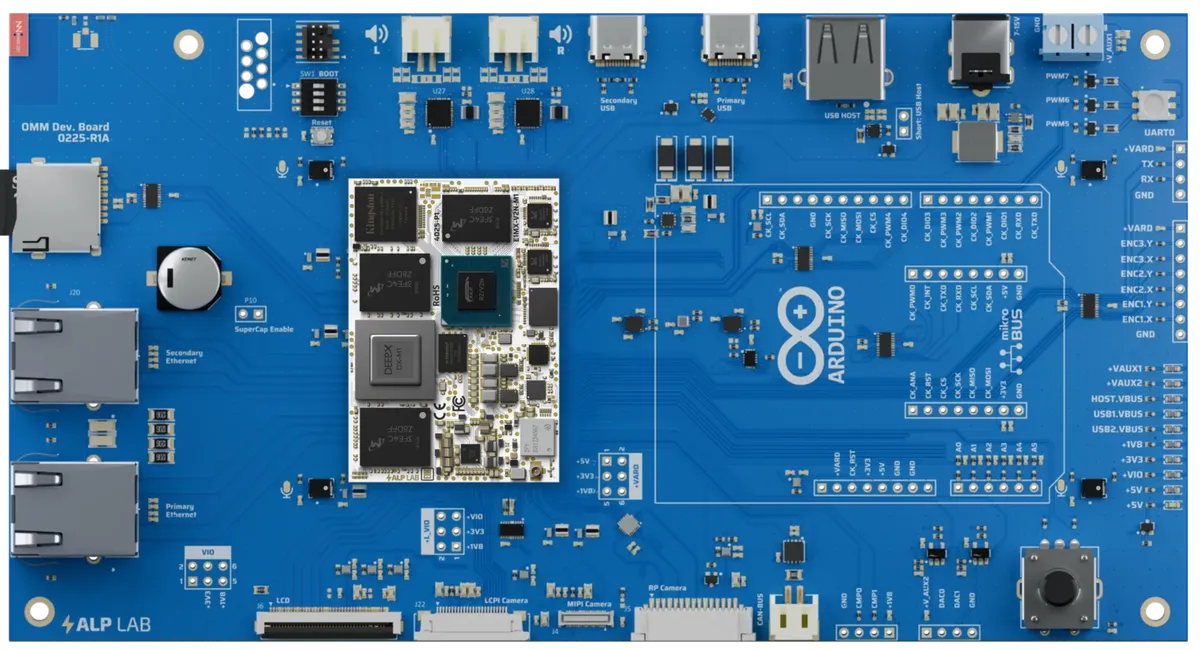 The E1M-X EVK hosts V2N family and V2N-M1 family modules on its E1M-X footprint (45 × 65 mm module). It exposes:
- Dual gigabit Ethernet (two RJ45 ports, both routed to the Realtek RTL8211FI-VD-CG PHYs on-module)
- USB 3.0 Type-A host `J29` (`USB0`, switched VBUS through ISL61852 `U56`); USB-C `J27` carries `USB2` (through mux `U47`) or the CP2102 console, selected by jumper `P11`; USB-C `J11` is a power input only (USB-PD sink, D+/D- not connected)
- Cameras: `CSI0` goes through the TI TS3DV642 mux `U1` to `J5` (15-pin) or `J4` (22-pin); `CSI1` is on the 60-pin Hirose DF40C board-to-board connector `J12`; an 8-bit parallel camera connector `J22` (24-pin) is also fitted
- Two 40-pin MIPI-DSI FFC connectors: `J6` on `DSI0` and `J28` on `DSI1`. Only Display 1 (`J6`, `DSI0`) is usable with V2N / V2N-M1 modules; Display 2 is permanently unavailable on this revision. The `J6` reference panel (Rocktech `RK055HDMIPI4MA0`) has a Goodix GT911 touch controller, but the X-EVK V2 carrier does not connect its I²C to any module bus, so touch is not reachable on this revision
- Industrial-grade audio (2× TAS2563 smart amps + 4× PDM mics)
- On-board sensors: ICM-42670 and BMI323 IMUs, BMP581 barometer — **no LSM6DSO and no GNSS receiver**
- Power instrumentation: four INA236 rail monitors — `U21` +3V3 `0x40`, `U31` +1V8 `0x41`, `U32` +V_CAM2 (INA236B) at `0x48` as built (`0x4B` after the A0 rework), `U34` +V_CAM3 `0x49` — plus an INA228 (`U30`) +5V input monitor at `0x42`, which answers only on carriers with the I²C bus-pin rework. As built, `U32` cannot be read because `0x48` is also the TAS2563 global address — see [`v2n-power-monitor`](https://docs.alplab.ai/sdk/examples/v2n/v2n-power-monitor)
- `CAN0` / `CAN1` on 2-pin connectors `J24` / `J25` with fixed split termination. The TCAN1044AVDRBRQ1 transceivers `U51` / `U52` sit on alternative 0 Ω links. As assembled, the bypass links `R235`–`R238` are fitted and `R227`–`R234` are not, so `J24` / `J25` connect straight to the SoC's 1.8 V CAN-FD logic pins (see the warning below).
- Header-broken-out PWM channels (driven by the V2N's on-module GD32 supervisor)
- microSD slot
- Debug: the Silicon Labs CP2102 USB-to-UART console (`U29`) on USB-C `J27`, and an external SWD probe on the 10-pin SWD/JTAG header `J2`
:::danger[CAN: hardware-damage hazard as assembled]
With a V2N / V2N-M1 module, fit `R227`–`R234` and remove `R235`–`R238` before connecting a CAN bus to `J24` / `J25`. As assembled, `J24` / `J25` connect straight to the 1.8 V SoC CAN-FD pins, and a live bus can overstress them.
:::
Declare `preset: e1m-x-evk` to pick up the populated chip list.
## Using an EVK as a reference design
Two patterns to fork the EVK preset for a custom board:
### (a) Reference + override (small derivatives)
Drop the `preset:` line and write the board out inline at the top level, copying the EVK file as a starting point:
```bash
cp metadata/boards/e1m-evk.yaml my-app/board-fragment.yaml
```
Then paste the `name:`, `populated:`, `e1m_routes:` blocks from `board-fragment.yaml` into your project's `board.yaml`, change `name:` to your own, and edit the deltas (drop chip rows you don't populate, add the rows for chips you do, edit the `e1m_routes:` entries to reflect your schematic).
```yaml
som:
sku: E1M-AEN801
name: my-derived-board
populated:
bmi323: true
icm42670: false # one IMU is enough on this design
bmp581: true
tas2563: false # production board has no speaker amp
ina236: false # no current monitors
e1m_routes:
# … paste from e1m-evk.yaml and edit per your schematic …
```
### (b) Fork the board preset (full custom boards)
Same pattern, but keep the YAML in the SDK tree if you want it shared across multiple projects:
```bash
cp metadata/boards/e1m-evk.yaml metadata/boards/my-board.yaml
$EDITOR metadata/boards/my-board.yaml
```
Then in `board.yaml`:
```yaml
preset: my-board
```
See [`board.yaml` reference](https://docs.alplab.ai/sdk/board-yaml) for the full schema.
## Ordering
[Request a Dev Kit](https://alplab.ai/developerskit-form/) to receive an EVK paired with a SoM of your choice.